Valve does what Nintendon't
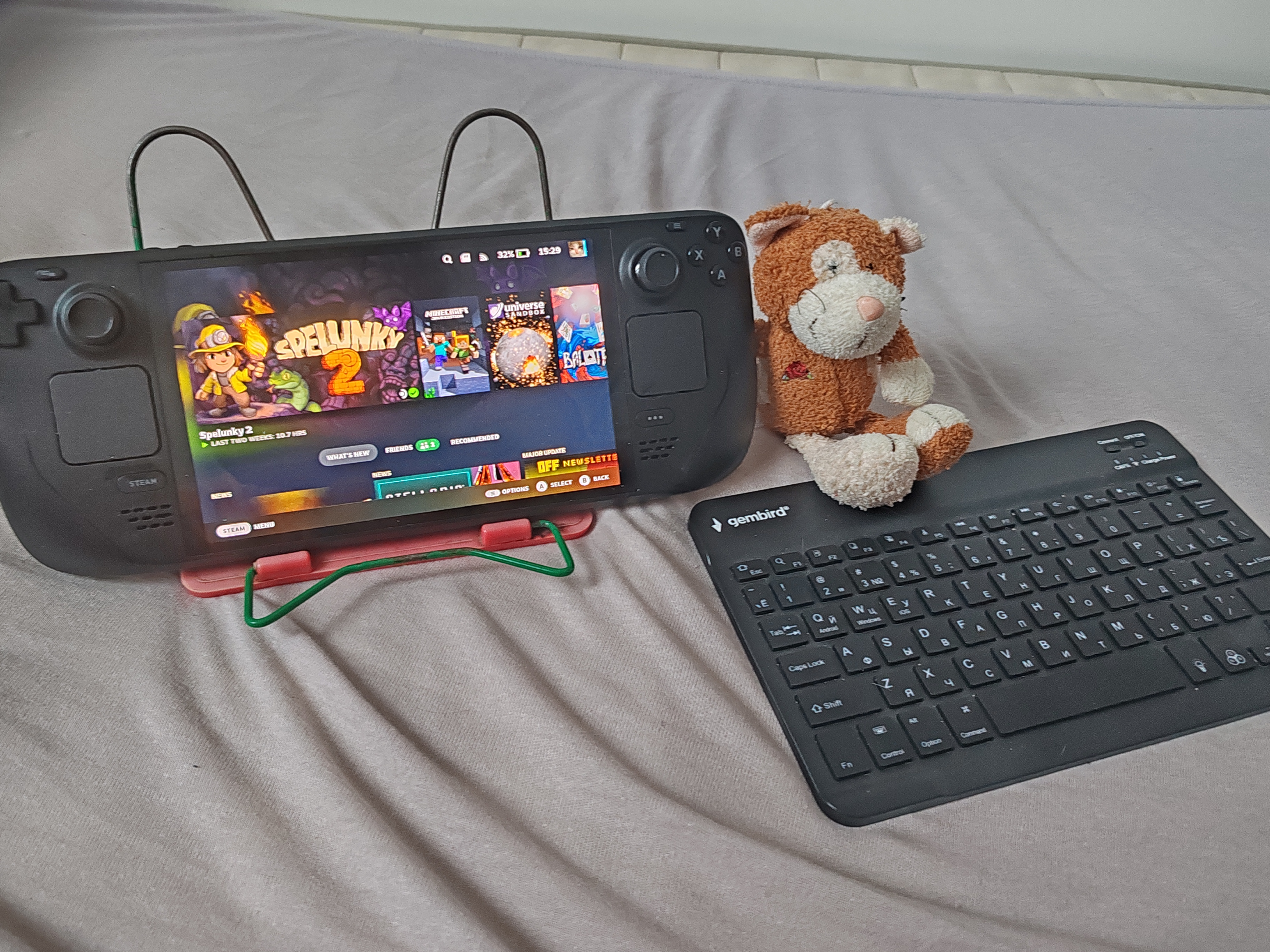
So in mid-October of this year, I got a Steam Deck for my (or rather my host's; as you may know I am a headmate) birthday. It cost 50k rubles, which is about half of what our PC (mid-high end) costed. This made our parents rather apprehensive, of course, especially as it was listed as a "Gaming Console" on the e-shop we used. But we managed to convince them that it's more than that. We specifically got the 512GB OLED model. I'll talk about why a bit later.
So it arrived in a case (see third image). The case is nice and protects the device from both sudden bumps and falls, and the elements. I mean, don't throw it off a cliff or into a river or whatever and it'll be fine. Charging isn't possible while in the case, for a good reason, because it'll overheat otherwise.
So anyways upon startup you'll have to log in to Steam to use it, or make an account on Steam if you don't have one. Then wait a while as it downloads firmware. It was a bad first impression as the internet was down at the time we got home with it, and was really slow after. But after this, updates are unobtrusive. Upon startup, it's in "Gaming Mode" (seen on the first image). This is basically full-screen Steam launcher, with all apps aside from it closed for better performance. I recommend going to this mode when playing heavier games (and some not-so-heavier games have less jank when using it too). Somewhat out of the way, in the same setting panel that you use to turn it off, is an option to switch to "Desktop Mode". This is a fully-featured Linux (Arch distro, specifically a variant thereof called SteamOS) desktop! The potential is really limitless with this, it can run basically anything Linux can run; you're not limited to lame Android apps or Apple's gilded cage of an "ecosystem". You can run games from other launchers (Epic, Ubisoft, whatever), or games... acquired through external means (arrr). Note that the builtin flatpak store may or may not be broken. It was for me for a while until it randomly fixed itself. However, flatpaks are possible to install via the terminal even if so; and appimages and packages from Arch AUR are available regardless. If all this sounds intimidating to you, don't worry. Linux has this reputation as an OS for geniuses and hackers, but it can be figured out via a bit of internet searching. Once you set things up (the default software is barebones compared to "normal" Linux), you can do productivity tasks, write, watch videos, and more. It really is a full-featured computer you can tote around with you.

...the one flaw with Desktop mode is that the onscreen keyboard (press X to open it in desktop mode, and Steam+X in gaming mode) is genuinely atrocious, which is forgivable in most games but makes the desktop mode tedious to use for writing or terminal work, unless you use an external keyboard. It's floaty, laggy, sometimes gets stuck spamming the "g" key for some reason, is just plain too big for the screen that is the size of a small tablet, and for whatever reason has no predictive typing function. For fuck's sake Valve, was it so hard to have a simple Markov chain predictor like on every phone ever (including many dumbphones)? That would make the onscreen kb way more usable. It's like they had a deal with Bluetooth keyboard manufacturers, because honestly even a cheap 15 dollar Bluetooth keyboard is worth every cent with this, and works perfectly, eliminating this flaw. Make sure to pick the really thin and light ones if you are going to type while on public transport etc; I suggest holding the keyboard in hands and typing that way while the deck is in an open case on your knees. Yes, people are going to ask what the hell that thing is. Tell them it's a Game Boy Color. Or not. Another flaw is the lack of a builtin kickstand but the case can be used as a somewhat unwieldy one. Or you can use a book stand (the one in the first photo is older than me). It's too heavy for most smartphone stands. Or you can buy a really cheap kickstand meant for the Deck off an e-shop and it does its job well. Understandable why Valve omitted this so whatever. Another flaw is that SteamOS updates sometimes reset some desktop stuff. They don't touch flatpaks or app images but they do touch packages. Use flatpaks and you'll be good.
Anyways, on to the actual specs and how well it does in gaming!
- 6 nm AMD APU
- CPU: Zen 2 4c/8t, 2.4-3.5GHz (up to 448 GFlops FP32)
- GPU: 8 RDNA 2 CUs, 1.6GHz (1.6 TFlops FP32)
- APU power: 4-15W
- 16 GB LPDDR5 on-board RAM (6400 MT/s quad 32-bit channels)

This is roughly equivalent to a PS4. It's less in raw power, but the screen is lower resolution, so that evens out; and of course it plays PC games, not (only) PS4 games. So it can play the vast majority of video games ever released, frankly. Everything from Atari 2600 to what was AAA games in the early 2020s. It will struggle hard with recent AAA games; and some are unplayable anyways if they have kernel-level anti-cheat-- which is solved if you install Windows, but why would you do this to yourself? The Windows experience is miserable on such a tiny screen and you lose a lot of the integration with the hardware that SteamOS has. Also, this is a good opportunity to learn Linux. All but the heaviest of games run smoothly and with minimal setup-- sometimes you may have to rebind controls but the UI for this is very intuitive and there are community layouts. Genres that work well are action games, shooters, platformers, racing games, and so on. The genres that don't work well are strategy games and classic roguelikes as well as multiplayer games with lots of text chat like Among Us (solvable with a bluetooth kb). You can also use Krita or Aseprite in it for an impromptu drawing tablet, though there's no pressure recognition. Also, it runs Minecraft very well-- download Prism Launcher and add it as a non-Steam game in the launcher to use it in Gaming Mode, then rebind the keys as needed. Similar process for other non-Steam games.
By the way, I suggest binding "Gyro to Mouse" in the controller setups to touching the right stick. In all games that use the mouse, as well as in the desktop mode, it's very natural for fine movements. Unless you're in public transport or walking, in which case this will cause the cursor or camera to shake wildly. The trackpads are good enough, though! The left one is, by default, a scroll wheel, but I like binding various areas of it to different keys. The right one is a simulated trackball that controls the mouse cursor. It's slightly less precise than a mouse but that's why I said to bind the gyro. Overall the trackpads are the edge that the Deck has over similar handhelds like Legion. They make it much more usable as a general purpose device. And likewise for the back grip buttons, they are very good for more complicated games that have lots of different abilities and such. If you run out of these you can remap the left trackpad to be a radial menu, or cannibalize the D-pad for more buttons. Anyways, the gyro is very precise. First-person shooters are quite playable thanks to it, but take a bit of getting used to. You basically tilt the device slightly to aim-- I recommend tinkering with the sensitivity settings until it feels right.
I heard you can connect it to a TV or monitor and use it as a normal console or computer but I never tried that. I suppose that's a good way to get a prebuilt low-end gaming PC for a good price. It's actually cheap considering its specs because Valve sells it at a loss, because they believe it will result in more Steam game sales. Apparently that succeeded. Another reason to not bother with the other handhelds like Legion-- they're comparatively overpriced.
The screen is exquisite on the OLED model. Very crisp and high-dynamic-range image. No burn-in that I noticed. Just be careful with it and get a protective covering for it if you're clumsy, and always put the deck in its case if you're in danger of something nicking the screen. The fan is... very noticeable if running an intensive game while in a quiet room. A constant whooshing sound that can drown out sound if on low. Not noticeable in public though. Yes, the smell is kinda nice. It vanished after a few weeks, probably for the best because whatever those fumes were can't have been healthy. The battery life... varies heavily. Web browser in desktop mode can last for the better part of a day. Light games, 6 hours or so. Heavy games, maybe 2 hours. The charger that's packed with it is very good and can also fast-charge smartphones-- speaking of which, my deck has mostly supplanted my phone for tasks that are not calling, taking photos, or using banking apps. I recommend getting a power bank and/or taking the charger with you if you intend to travel with the deck. Which is a good proposition-- it's cheaper than an equivalent-specs laptop, and is smaller even if a bluetooth keyboard is used. The ergonomics are good and it's just light enough to be comfortable to hold, it'd give me wrist pain if it was any heavier. I recommend using it with a stand if you have wrist issues. As for the models, the 512GB OLED is the clear best value in my opinion. Yes, the 1TB OLED has an even nicer case, but it's also noticeably more expensive and the kinds of games that need hundreds of gigabytes won't run on it anyways. The LCD models are notably cheaper, but even if you don't care for the nice screen; consider that the battery life is much lower in these and they are heavier.
...I frankly don't see a good reason to get a Nintendo Switch 2 when this exists, unless you really truly want the exclusives. Hell, it can near-perfectly emulate (arrrrr) the first Switch. You get what exactly with that, over the Deck? Overpriced games? Worse ergonomics on the controllers? A walled garden software ecosystem? Planned obsolescence? At least even if/when the Deck becomes very low-end in terms of specs, it'll be a perfectly usable Linux box-- and it helps that its components aren't too hard to replace or repair aside from the APU which isn't upgradeable. But Switch 2 servers will eventually shut down and with it its store.
This in a way mirrors the famous SNES vs Genesis console war. Nintendo marketed itself as the "safe" console, relying on brand loyalty and established reputation. Sega was the uncensored newcomer. Unfortunately Sega dropped the ball in the following generations, and Nintendo ended up decisively winning for a while. Here's hoping Valve doesn't mess up with their next devices-- though the new Steam Machine (a beefier, not handheld, prebuilt gaming PC with the same software as the Deck) and the Frame (self-contained VR headset) seem fine. Xbox is dying, so I feel like Valve might be poised to take Microsoft's place as the third major entrant in the console wars. Nintendo and Sony aren't going anywhere, but Valve does what Nintendon't. ;-)
(I am not in any way affiliated with Valve or any other company mentioned).